Showing posts with label focus. Show all posts

Monday, November 5, 2018

Going Old School - Purposefully Working In Manual Focus Lenses

Nikon Df / Nikon 20mm f/3.5 AIS
1/320, f/8, ISO 800

I've done a lot of soul searching over the last 31 days.  Starting Oct 1, 2018 I purposefully disconnected myself from social media sites, forums and a bulk of the internet for 31 days.

I kept my business posts going by using schedulers and had all that I wanted to publish ready to go.

Over that 31 days, I've learned a lot about myself, where I want to go and who I want to be going into the future.

Let me start of by prefacing this with one thing.   I'm so sick and tired of the know it all pundits, click bait articles and YouTube videos.   I've not missed the online forum arguments where the trolls come out and pick fights or those that don't have a clue claim to be experts.

I'm one person with an opinion sometimes.   Opinions are good as they give you perspective into the way that others think.  Opinions about anything can be done respectfully or they can be represented in absolute douche-baggery.   Not going to lie, I've fallen into all those traps before - either victim to them or perpetrated them myself.

Those days are over, my friends!   After the last 31 days, I know that I am going to divest my life from the noise and find that awesome, low level under current of fellowship and knowledge.   I'm going to seek that out and offer it up.

Olympus EM5 Mark II / ZhongYi Speedmaster 25mm f/0.95
1/125, f/1.2, ISO 500

With that being said, the title may have you wondering.  No, I'm not going to tell you that working with manual focus lenses is the "only way to learn" or that "doing everything manually" is "true photography".   Too many judgments are associated with those kinds of thinking.   I'm going to share with you my journeys and experiences and allow you to glean from them what you will.

Also, along the way, we may not always agree.  I make this pledge that even if we disagree, that I will disagree respectfully.  We can have debates and disagreements - but we should never let anything that we disagree upon put us in a position that we cannot have a civil discourse about it.  This is, after all about photography.  It is about an art form that can be at times very scientific in how it is approached (objective) and at the very same time very subjective and up to the likes, dislikes or biases of the viewer.

Nikon Df / Nikon 105mm f/2.5 AIS
1/125, f/8, ISO 2000

Alrighty...soul bearing stuff out of the way, lets talk about manual focus lenses.   Yes, you've read it right - I purposefully decided to work one full day making images with only manual focus lenses and prime lenses at that as well.

I'll get into more of that detail later.  This article is also going to discuss manual focus photography in general.

Olympus PEN-F / Nikon 55mm f/3.5 Macro
1/320, f/4, ISO 200

Starting off, the WHY.

OK, why??   Why not!

Let's look at price.  I've had the good fortune of having 2 very well respected camera stores near me.  they have great selections in vintage SLR lenses.   Having Nikon f-mount cameras and adapters for our Micro Four Thirds cameras, I can take advantage of some great values.

My most expensive purchase on a manual focus lens so far has been $270 on a Nikon 180mm f/2.8 ED AIS lens.   My least expensive lens has been $30 for the Nikon 55mm f/3.5 macro lens.

Olympus PEN-F / Mitakon Creator 85mm f/2
1/500, f/4, ISO 200

Even for pixel peepers, the Nikon 180mm and 55mm macro are superbly sharp and worth the money even looking at them against modern lens designs.  If you are shooting macro or portrait, you can often get great images without the need of auto focus.

Now, let's get into desire.  Why would I want to work in this way.  Honestly, for me it is another way of approaching photography.   We already have so much automation, of which I am very thankful for, that sometimes I find the whole process very sterile.  Camera picks the exposure, you place the AF point over the subject and click the shutter.  Lather, rinse, repeat.   Did that sound like I was complaining?   On the contrary!!   Again, perspective.  If I am working a shoot for a client, I may only have a certain amount of time to work and the automation helps keep things moving along.   It makes getting the images that make me money easier to get.
Olympus PEN-F / Nikon 55mm f/3.5 Macro
1/400, f/5.6, ISO 200

Thinking different sparks imagination.  It makes you solve problems in other ways beside what you are normal.  All these things cause you to grow as a person and a photographer.  Growth is life, stagnation - death.

Image quality and rendering are another aspect we can look into.   I find that there is just something about the rendering of images from these lenses.  Could be the older coatings on the glass elements or the lack of coatings that make a difference.   Optical design is another consideration we do not want to leave out of the equation.   Some lenses just have a certain look to them, and if you find them appealing it is usually much easier to get what you want at the time of capture than trying to reproduce it in Lightroom or your post processing programs of choice.
Olympus PEN-F / Mitakon Creator 85mm f/2
1/500, f/4, ISO 200

If adapting these lenses to Micro Four Thirds systems, you also get the benefit of being able to use the in body image stabilization!

Now, let's get into the HOW.

Working in manual focus makes you think differently, we've established that previously.   No longer are you always placing the AF point on a subject, letting the camera track it and pressing the shutter with 99% success rates.

You need to pre-plan how you are going to capture the focus. Sometimes you can capture right on the subject, if they are not moving too fast for you to keep up.  Other times, you'll want to try and find a place in the area you want to capture the subject, pre-focus there and when they come into that area or zone, you actuate the shutter.  What also helps in this is using a sufficiently deep depth of field, so that there is a good size area for the subject.  Razor thin depth of field makes this technique a challenge.
Olympus PEN-F / Nikon 55mm f/3.5 Macro
1/100, f/3.5, ISO 1000

Manual focus assist systems are also another thing to consider.    Back when the norm was manual focus, camera makers would make the focusing screens/ground glass in such a way that helped you know when something was in focus.   With the advent of auto focus and it being the dominant method of focusing, less expense and time is placed on these focusing screens in SLR/DSLR cameras.

What you do have is auto focus confirmation systems that assist you.  Like on the Nikon DSLRs, there is a yellow dot in the viewfinder display that tells you when it thinks the image is in focus based on where the current focus square is located in the viewfinder.   If you have a higher end camera, you also get some assist arrows that let you know which way you should be turning the focus ring to get to proper focus.
Olympus PEN-F / ZhongYi Speedmaster 25mm f/0.95
1/8000, f/0.95, ISO 200

Using these lenses on adapted cameras, like Fujifilm, Sony or Micro Four Thirds, you get even more options.  You can surely try and eye ball the focus on the EVF.  However, knowing that the mirrorless cameras would be popular choices for adapting older manual focus lenses, there are other options.  The most popular are focus peaking and punch in zoom.

Focus peaking allows you to pick a color and when that color outlines items on your EVF, those are the sections that will be in focus.

Punch in zoom gives you the ability to select a section of the scene and zoom in, allowing you to see exactly what is in focus.  Some cameras have more than those and others allow multiple varieties at the same time.  For example Micro Four Thirds cameras allow for focus peaking and zoom in punch together.
Olympus PEN-F / ZhongYi Speedmaster 25mm f/0.95
1/6400, f/1.2, ISO 200

Finals Thoughts.

Not only do you get to try out many different kinds of legacy lenses and see what they are capable of...you also get to try something different.  There is something very satisfying to me about being able to use a lens made in Japan by Nikon from 1977 and dazzle people with the image.  Unbeknownst to them that the lens used may be older than they are!!

Personally, I like the workflow.    For me, photography is about the image...surely....but I often tell people that the journey we take is often just as, if not more so, important than the destination.  I enjoy the entire photographic process.  From selecting lenses, checking the cameras exposure and making subtle tweaks to editing selections and post processing.

Manual focus cameras and lenses are just another way to go about something.  Doesn't make it right or wrong.  It is just different.

Olympus PEN-F / ZhongYi Speedmaster 25mm f/0.95
1/800, f/4, ISO 200

Olympus PEN-F / Zhongyi Speedmaster 25mm f/0.95
1/2000, f/1.4, ISO 200

Olympus PEN-F / Zhongyi Speedmaster 25mm f/0.95
1/100, f/1.2, ISO 640

Olympus PEN-F / Laowa 7.5mm f/2
1/100, f/2, ISO 5000

Olympus PEN-F / Laowa 7.5mm f/2
1/1250, f/4, ISO 200

Olympus EM5 Mark II / Laowa 7.5mm f/2
1/200, f/4, ISO 200

Olympus PEN-F / Laowa 7.5mm f/2
1/100, f/4, ISO 1000

Olympus PEN-F / Nikon 180mm f/2.8 ED AIS
1/400, f/4, ISO 200

Nikon Df / Nikon 20mm f/3.5 AIS
1/500, f/5.6, ISO 100

Nikon Df / Nikon 20mm f/3.5 AIS
1/60, f/8, ISO 5000

Nikon Df / Nikon 180mm f/2.8 ED AIS
1/250, f/4, ISO 160

Nikon Df / Nikon 135mm f/3.5
1/500, f/3.5, ISO 100

Nikon Df / Nikon 200mm f/4 QC
1/500, f/8, ISO 4500

Nikon Df / Nikon 180mm f/2.8 ED AIS
1/800, f/4, ISO 100

Wednesday, December 21, 2016

Olympus O-MD EM-1 Mark II Review - First Impressions

Image © Olympus America


Background


Some things just run in your favor.  I was doing some house keeping with my photo gear and I realized that I had a lot of lenses and cameras that I do not use much anymore.

While I have appreciated the excellent image quality of the Olympus prime lenses, I find that I just do not use them enough or need them to justify keeping them sitting in the office.   My purchase of the Olympus OMD EM5 Mk II was an upgrade to the original EM5, but also as a smaller every day carry camera.  Since getting the Olympus PEN-F, the EM5 Mk II has not really been used much either.

Selling off some of the prime lenses (25/45/75 1.8) and the EM5.2 funded the purchase of the Olympus EM1 Mark II.

The video capabilities of the EM1.2 surpass that of the EM5.2, so I'm not losing anything there.  The EM1 series also have PDAF capabilities, so it makes the AF more efficient, especially in C-AF deployments.

Due to some current personal issues, I've not had a lot of time to get out and shoot sample images with the EM1.2.  Once I do, I will publish another post with tons of image samples.

Image © Olympus America

Handling/Weight/Size

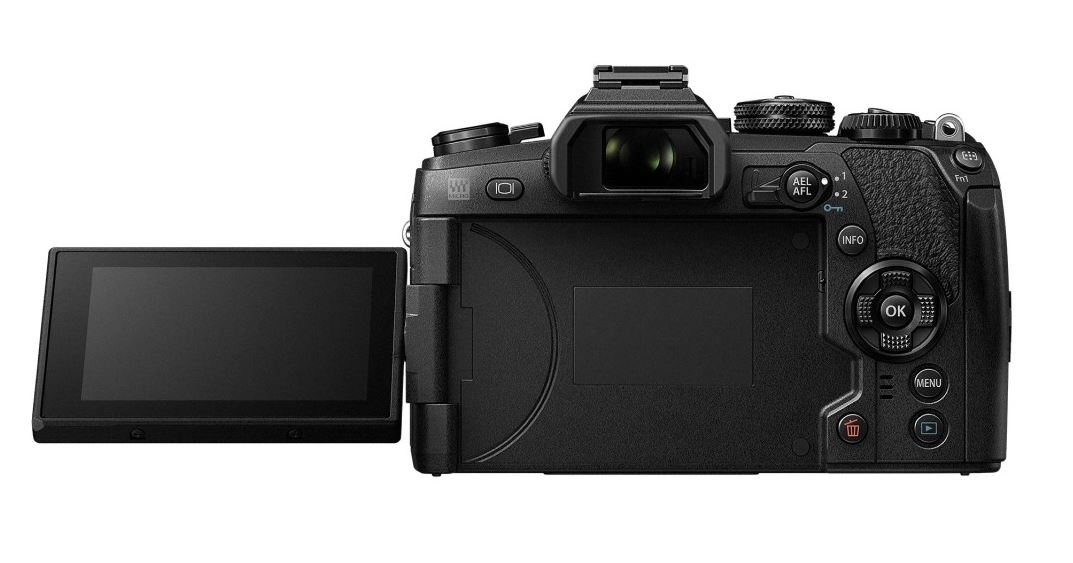
The EM1.2 is slightly larger than the EM1.1.  While the original EM1 fit in the hand well, the EM1.2's larger size makes it a perfect fit in my hands.  It feels much like a DSLR, but without the weight of one.

The buttons feel good and are in good ergonomic locations.

The front and rear dials feel a lot like the EM1.1.  The front dial on the EM1.2 feels a little less "clicky", more smooth but the click is still there.

A new addition is the power switch.  The power switch is still in the same location as the original EM1, but Olympus has added a remapping.  The function 1/2 lever can be remapped to the power switch.  This would then provide the ability for the user to power the camera on/off with one hand it that is desired.  Not something I would probably use, but something that might be of interest to others.  Another note about the 1/2 lever.  It is mounted in the opposite direction.  The EM1.1, the ler is pointing toward the outside of the camera, where as the EM1.2 has the lever facing toward the viewfinder.
I find this a better configuration as I would sometimes accidentally knock the EM1.1 lever into position 2, would not know it until I tried to change the aperture setting and be changing the white balance instead.

The menu button has moved. It is further to the end of the camera and the play button moved down.

The top plate is pretty much the same in regards to button position.

The camera also comes equipped with dual card slots.  You can decide if you want them to be used consecutively or redundantly.

The mode dial has the addition of 3 custom settings.  I set mine up in the following manner

C1 = normal shooting mode.  The everyday mode for single point AF stuff.
Sharpness -1
Contrast +1
S-AF
i-Natural picture profile
Single Servo
3:2 aspect ratio
Large SuperFine JPG

C2 = sports shooting mode - ready for fast moving subjects
Sharpness -1
Contrast +1
C-AF - group pattern AF (looks like a cross)
i-Natural picture profile
Continuous servo high
3:2 aspect ratio
Large SuperFine JPG

C3 = B&W street shooting
Sharpness -1
Contrast +2
Green filter
S-AF
Monochrome picture profile
Single Servo
1:1 aspect ratio

Large SuperFine JPG + RAW(so I have the ability to get a color version if I so desire)

Much easier to access than going into a menu and picking a MySet or remapping existing dial options.

While we are on the subject of MySets - those are technically gone.  Instead, you map the C1 through C3 dials; menu options for setting and retrieving are a lot less confusing.  The menu names have been renamed, so you know when you are saving the settings or retrieving them.  You still cannot name the presets, but that is less of an issue since they have their own dedicated place on the dial.


Image © Olympus America


Image Quality

I've not done a head to head against the PEN-F sensor, which is also of the 20mp variety.  The EM1.2 sensor is a step up from the EM1.1, which is 16mp.

Reports have stated, as well as Olympus, there are some modest image quality increases.  These increases come in dynamic range, noise performance.  This is good, considering that the mega pixel count has increased.   I'll take any improvements, no matter how little.

1/80, f/4, ISO 1000 @ 40mm
Oly 12-40/2.8 PRO

1/80, f/2.8, ISO 2000 @ 40mm
Oly 12-40/2.8 PRO
1/60, f/2.8, ISO 1000 @ 12mm - in camera monochrome 1:1 crop
Oly 12-40/2.8 PRO

1/60, f/2.8, ISO 1250 @ 12mm
Oly 12-40/2.8 PRO


Auto Focus

Point to point single AF I can see an improvement in low light AF.  The speed is much quicker and seems more confident than in the past.  In good light, just about every m43 camera with most lenses are near instant anyway, so not much is going to be gained there.

At release, there appears to be no way of making the AF points a smaller size.  On the previous camera, there were 2 sizes of AF boxes, selectable by activating the focus point using the direction pad, holding the INFO button and turning a command dial.  This appears to be missing.  Not sure if the new focusing algorithm no longer uses it or if it is something that will be made available in a future firmware update.  I plan on reaching out to Olympus support to request some information.

The focusing modes remind me a bit of how the Nikon D500 functions.  You get the single point AF, then a "group" type AF set of boxes.  Also a square box of 9 AF points, then the full grid which would be similar to 3D or auto selection AF point.   Lastly, the Olympus C-AF + tracking option is also back.


Above is a low light video focusing test.   12-40/2.8 was used, exposure setup at 1/60, f/2.8, ISO 6400.   I engaged the manual focus clutch, turned the ring to infinity, set the clutch back to AF, then pressed the shutter release half way, then repeated the above process, but turned the focus ring to closest focus distance.

Continuous AF is where everyone and me included wanted to know about.  Marketing claims that the AF is, and I'm quoting, "just as good as some flagship DSLRs".   With a claim like that, you better believe that I plan on putting it to the test.

Upon initial testing after first getting the Mark II, you can see that the initial C-AF acquisition is much improved.    One of the issues I've had previously was initially getting the focus lock in C-AF mode.  It lagged a bit, but once locked, did well on predictably moving subjects.

EM1.2 initial lock is almost as fast as S-AF.  Much more usable.

Some people were hoping for a dedicated joystick for electing AF points, similar to the Nikon D500.   Olympus has not done that, but they have included trackpad focusing on the rear screen.  When activated, you can use the touch screen when the viewfinder is active for selecting the AF point.  While not the same as a dedicated joystick, it might satisfy some users looking for an alternative to the legacy direction pad.

One thing missing from the EM1.1 is the smaller AF points.  As seen here from my EM1.1, the smaller, square boxes are not a selectable option on the EM1.2.

the "normal" AF points from the EM1.1 and EM1.2


the smaller, square AF points

I put a support ticket in with Olympus to find out why they are not there and if they will return via a firmware update.
I care about this feature because the AF performance was more accurate with the smaller boxes on the EM1.1.  Perhaps the new AF process does not require the manually added precision of the smaller boxes.

Olympus Support responded and said that at this time there is no plan to have smaller AF points and that since there are more AF points than previously on the EM1.1, this is the configuration for now.

Ok...I've been wordy enough.  Now the moment of truth. How does the AF tracking work.

EVF Blackout and refresh rates.
Normal EVF is better, but there is also a "high" setting for even less blackout.  The manual states that frames per second capture might be reduced if you are using the high EVF setting.

The EVF lag is very minimal and should make for a much easier time when tracking subjects.

Battery Life

Powered by the new BLH-1 battery, I tested the EM1.2 in video capabilities for a project.   I cannot share those videos just yet, but I can share some technical aspects of the shoot in regards to the battery life.

This shoot was outside.  The ambient temperature was 20F.  The camera was continuously on for 2.5 hours, using the rear LCD.  Shooting parameters were 1080p/60fps.  1/60, f/4, ISO 400.  S-AF to get initial focus.  IBIS activated.

Also, the night before this shoot, the camera was used for testing low light AF, Pro Capture mode.

The camera reported 50% battery left.  I consider that very good given mirrorless cameras proclivity to burn through batteries pretty quickly.  The EM1.2 new battery and I'm sure internal efficiency contribute.

Video

4k video capable here.  I'm new to video, did a little bit for a project.  I've mentioned those specs and the battery life up in the battery life section.

Olympus is not usually known for its video capabilities. While adequate for some, most who wanted to do video would go for a Panasonic camera.  The gap has closed since the release of the EM5 Mk II.  It was way better, but not perfect.  The EM1.2 is even better.

The sensor readout speed increase makes the rolling shutter effect minimal for panning and moving subjects.

There are 2 varieties of 4k recording.  Cinema 4k provides up to 30fps and a 237 MBps output, while standard 4k is also out to 30fps but at a lower bit rate of 202 MBps.
1080p video is capable of 60fps with varying bit rates from 52MBps and down depending on the quality setting selected.

The IBIS works great and provides the ability to record smooth hand held videos.

Audio input is a 3.5mm microphone jack, monitoring is provided by a built in headphone jack.

Here is a quick 4k sample video.  Nothing earth shattering, but something to view.
Exposure setup is 1/60, f/4, ISO 400 - camera on tripod.  Standard 4k(so 202MBps, not cinema 4k - 237MBps).  The video is SOOC with the "flat" video profile.  No correction or grading was done to it.


A feature of note that some might appreciate is the ability to pull stills from the 4k feed. From what I can see, this is done in camera during video review.  You go to the frame in the video, select the menu option and it will pull out a still frame from the video.  I have to look and see, but this might be accomplished in the Olympus Viewer software.  That would make sense, but I have not checked this myself yet.

The digital tele-converter works in all modes in video and it does not appear to affect the bitrate at all.

Other Misc. Items of Note

Pro Capture Mode:
I first saw something like this back in the Nikon 1 series cameras,  Not sure if this is something that was done in a camera prior.  I initially thought it a bit gimmicky, but after using it, I can see the benefit of it.

There are 2 modes, a low and a high.
The basic function of it is that you half press to focus and start the capture process.  During half press, the camera automatically starts capturing a pre-determined number of frames.  For example lets say the option is set to capture 10 pre frames.  Once the shutter is pressed all the way down, that frame is captured.  If you look at your captured frames, you'll see that there are 10 previous frames and then your last frame.

Great for times when you are wanting to capture a bird in flight grabbing a fish from the water or the bird leaving a branch.

The one point of concern for some shooters might be that this is done using the electronic shutter.  I've not done enough tests to know if there are any negative effects to image quality using this mode.  Trust that I will test it out more thoroughly and report on my findings in the future.

Shutter Sound:
The shutter seems to be more dampened, and the sound of it is very muted in comparison to the other m43 Olympus cameras.  Quite is good.

PreMF Focus Mode:
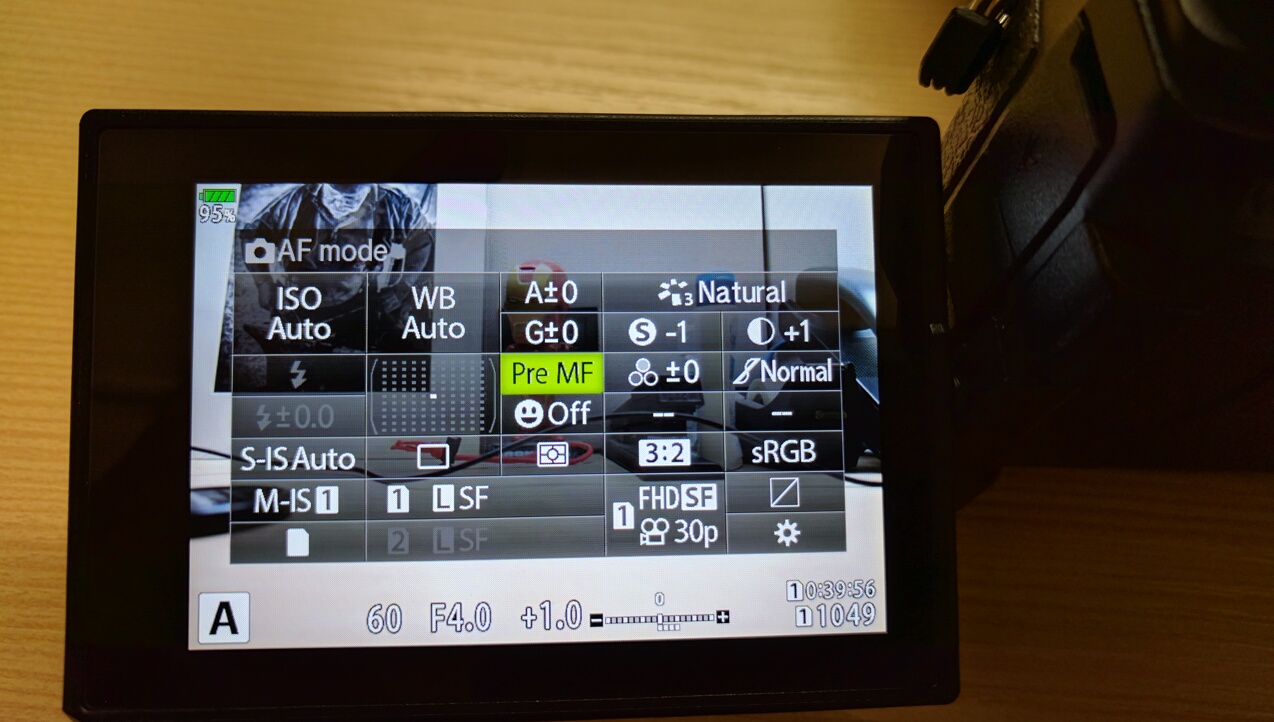
EM1.2 includes a feature some might like, especially those who like the Ricoh GR.
Olympus included a focusing mode called PreMF. This is for preset manual focus. You go into the Focus select menu and it is the last option. After pressing the OK button, press INFO to go into setting mode. Use manual focus or AF to set the focusing distance, then OK again. Now, the camera will stay locked in the preset focusing distance and it stays there even after power cycling the camera.


Size Comparison:
For those interested in the cameras size compared to my hand and a pen.  Here you go!  :D


Auto Focus Limiter:
Works with any micro four thirds lens.  I've only ever seen this function built into lenses before.  Now, it is available system wide with this camera body.

Bottom Line:
While this may not be the camera for everyone and the price tag might be off putting - one cannot deny that Olympus has provided a very capable and tech leading camera body.  It is difficult to get a product to market that stands out, and with all the capabilities Olympus put into the EM1 Mark II - people are talking about it.

If you can, get out there, try one out, and see if the camera is right for you.